

Reviews
Read and reply to reviews from Google and Facebook in one inbox, with a drafted reply ready when you want one.
Related docs: Listings | Presence analytics
Why reviews matter
Reviews shape whether a new customer picks you:
- They build trust: good reviews make you credible
- They lift your ranking: how many reviews you have, and how good they are, affect where you appear in search
- They tell you things: what customers value and what to improve
- They win customers: most people read reviews before choosing a business
Your reviews inbox
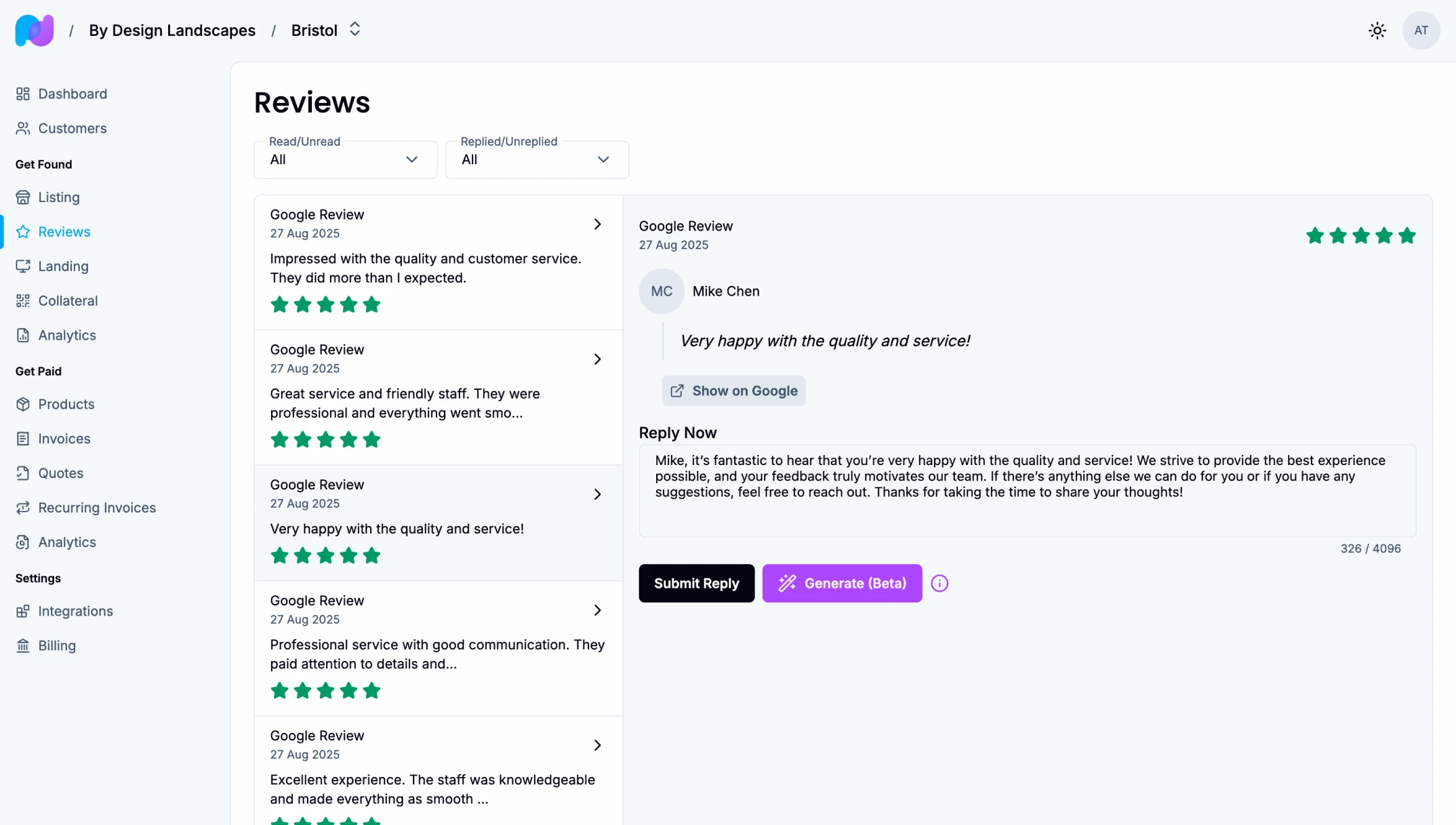
Every review left for this location on Google and Facebook arrives under Reviews. Reviews start arriving once your listing is set up.
Open one to see:
- Who left it, with their name and photo, unless they posted anonymously
- The star rating, from 1 to 5
- What they wrote
- When they posted it
- Which directory it came from, with a link to see it there
- Your reply, if you have posted one
Finding reviews
Filter the inbox by:
- Read status: opening a review marks it as read, and Mark as unread puts it back
- Reply status: replied or not replied
- Directory
On a wide screen the list and the open review sit side by side.
Replying to a review
A thoughtful reply shows customers you are listening, and shows everyone else how you treat people.
- Open the review
- Write your reply under Your reply
- Choose Post reply
Your reply is published under the review on the directory. To change it later, edit it and choose Update reply.
Some directories don't accept replies to every review. Paydough tells you when that is the case.
Generating a reply
Choose Generate reply to have a reply drafted for you. It is in beta, so check every draft before you post it. The draft:
- Uses the reviewer's name
- Thanks them for a good review
- Acknowledges the problem and offers to put it right in a poor one
- Reads like a person, not a template
- Is written in your language
Change anything that doesn't sound like you before you post it. If you have already written something, generating asks first, because the draft replaces your text.
Replying well
To a good review
Thank them and mention what they liked.
Good: "Thank you so much, Sarah! We're glad the quick turnaround helped. See you next time!"
Avoid: "Thanks!"
To a poor review
Stay calm, apologise and offer to fix it.
Good: "Thank you for the feedback, Mike. We're sorry this fell short. Please contact us at [email] so we can put it right."
Avoid: "That's not true!" or "We disagree."
To a mixed review
Acknowledge both sides.
Good: "Thanks for sharing this, Lisa. We're glad you liked the range, and sorry checkout took so long. We're working on it."
In general
- Reply within a day or two
- Use their name if they gave one
- Mention something specific from their review
- Keep it short: 50 to 150 words
- Offer a fix when something went wrong
- Never share private details or argue
Reporting a review
A review that is spam, offensive, no longer relevant or links to another page can be reported to the directory it came from. Open it, choose Report review, pick the reason and send it. The directory decides whether to take the review down; Paydough can't remove it for you.
Once reported, the review says Reported to the directory, and it can't be reported a second time.
Getting more reviews
- Ask happy customers to leave a review, at the moment they are happiest
- Make it easy: Collateral at your location has a Review QR code, a PDF to print and display that takes customers straight to your Google review page. It needs Google connected under Integrations in your location's settings
- Thank everyone who leaves one
Collateral also has a QR code for your storefront to add to your own designs.
Handling a poor review
- Reply publicly, so others see you care
- Take it offline with a phone number or email
- Follow up once it is resolved, and ask if they would update their review
- Learn from what they said
Report it only when it breaks the directory's rules, not because it is critical.
Tracking your reviews
Presence analytics shows your average rating, how many reviews you have at each star rating, and your reply rate, overall and by star rating, for the dates you choose. Compare one range with another, and look for themes that keep coming up in good reviews and poor ones.
Good habits
- Reply to every review, and always to poor ones
- Act on patterns you see in what customers say