

Payouts and fees
See each payment Stripe makes into your bank, the sales, refunds and fees inside it, and the fee on every card payment.
Related docs: Invoices | Financial analytics | Multi-location management
When your customers pay by card, Stripe collects the money and pays it into your bank account every Monday, less its fees. Each of those bank payments is a payout, and Payouts in your business menu lists them, so the amount you see on your bank statement always has a record behind it.
Payouts appear once card payments are set up for your business under Integrations in your business settings. One account covers every location, so a business with several locations sees all their card takings in the same payouts.
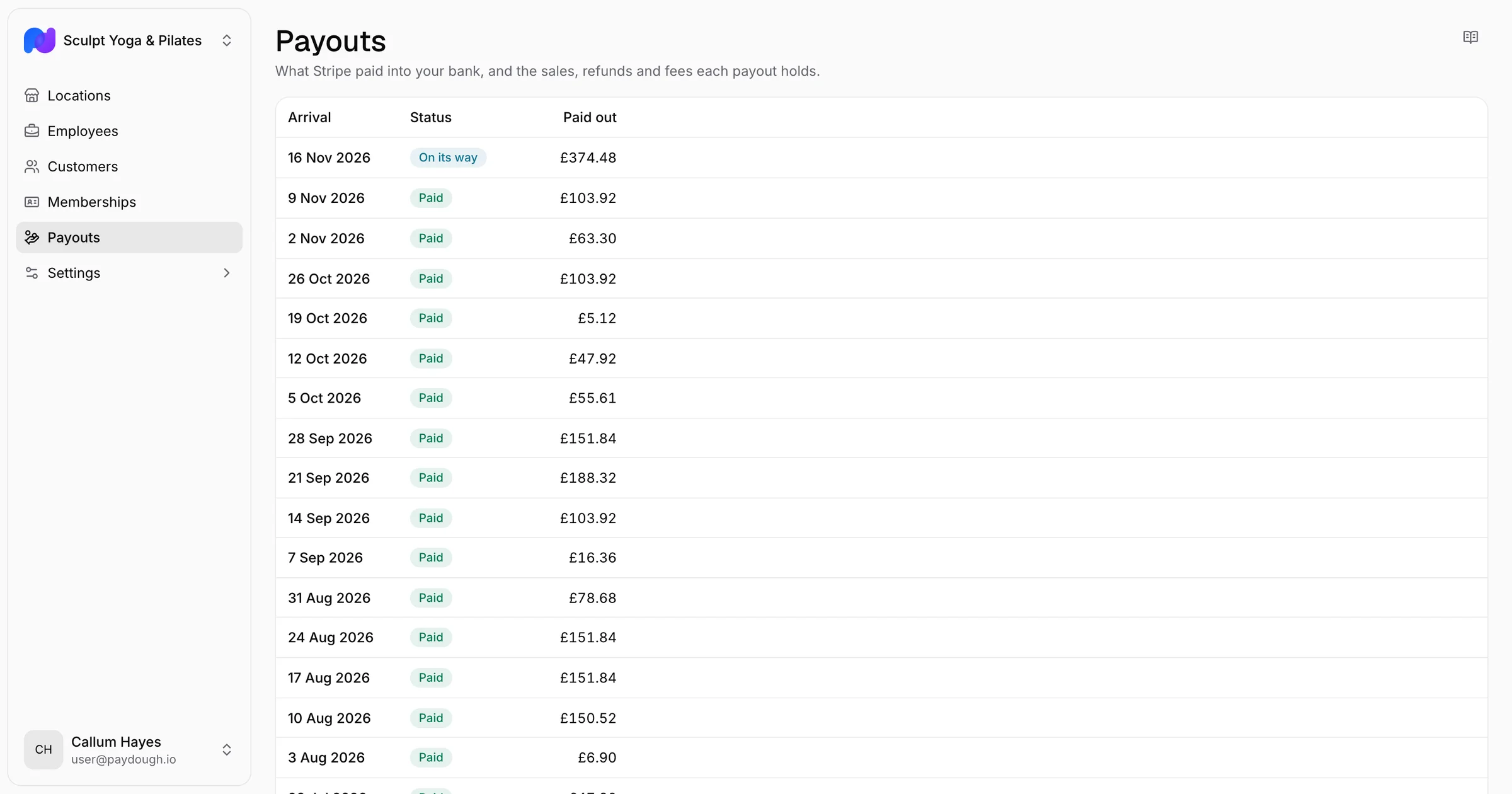
Seeing your payouts
Payouts lists every payout, newest first, with:
- Arrival: the day the money reaches your bank
- Status: Paid once it has arrived, On its way while it is travelling, Pending before Stripe sends it, and Failed or Cancelled when your bank turned it back
- Paid out: the amount that lands in your account
A payout that failed is usually a bank detail that needs updating in your Stripe account, under Integrations in your business settings. Stripe tries again once it is fixed.
Inside a payout
Open a payout to see what it holds. The top of the page shows three totals for the whole payout:
- Gross: what your customers paid, less any refunds
- Fees: what was taken for processing the card payments
- Net: gross less fees, which is what was paid into your bank
Below the totals, each line is one sale, refund or fee. A sale or refund shows the invoice it belongs to, the customer and the location, and opens that invoice. A line that is not a payment taken in this app, such as an adjustment Stripe made, says so.
Fees
Every card payment carries the fee taken for processing it. Your sales stay at the full amount your customer paid; the fee is a cost beside them, so it never lowers your turnover or the VAT you charge.
Exporting payouts and fees
Two sheets under Exports → Accounting carry the same figures to your bookkeeper:
- Payouts: one row per payout that reached your bank in the period, with its gross, fees, net and the amount paid out, taken from your business exports since the account is your business's
- Card fees: one row per card payment, with what your customer paid, the fee and what you received after it, by location
A card fee not yet reported shows an empty cell for a day rather than a zero.